Key takeaways
- Apple has released macOS 27.0.1 Golden Gate, the first update since macOS 27 launched on September 14, alongside macOS Tahoe 26.7.1 and macOS Sequoia 15.8.1.
- Apple mentions security fixes and performance improvements. Full security details are expected shortly.
- Apple has said AI-powered hacking is pushing it to ship security fixes faster, so these updates matter more than they look.
Apple released macOS 27.0.1 on September 28, the first update for macOS 27 Golden Gate, together with macOS Tahoe 26.7.1 and macOS Sequoia 15.8.1 for Macs still running older versions. The release notes are short: security fixes and performance improvements. Apple usually publishes the detailed list of security patches a few hours after release.
Short release notes can hide important fixes, but they can also hide new bugs. So the real question for most Mac owners is simple: update right away, or wait? Here is how we handle it, and why security updates are becoming harder to ignore.
In this article: What was released · Update now or wait? · The AI factor · Life with macOS 27 · How to update safely · FAQ
What Apple released today
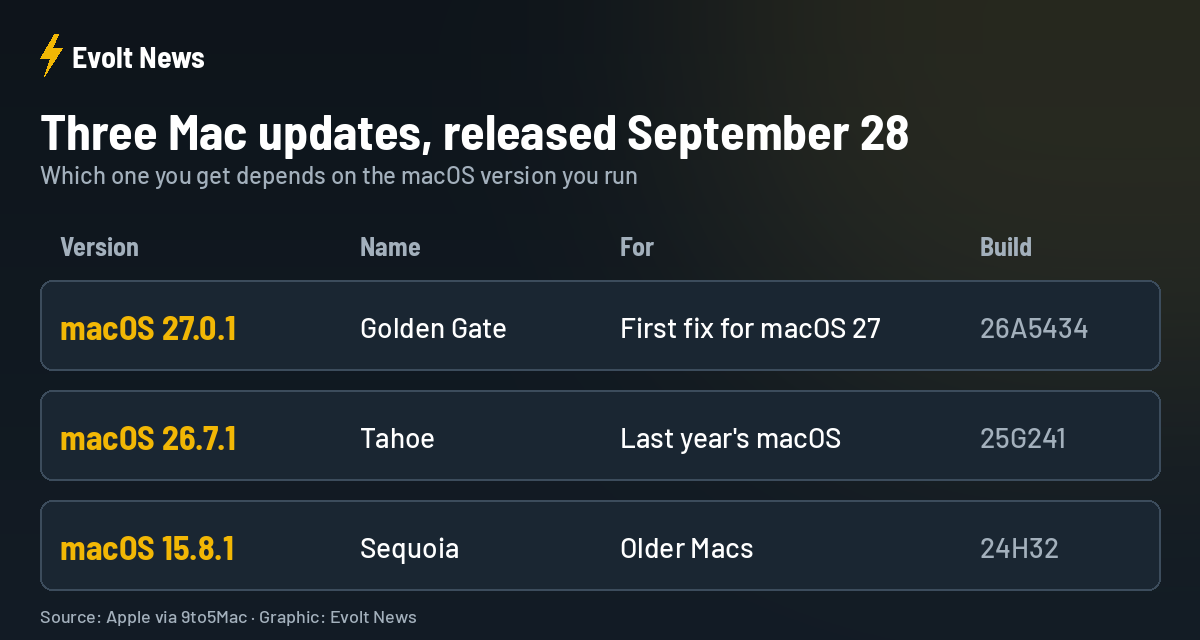
The updates arrive one week after the second release candidates for Tahoe 26.7.1 and Sequoia 15.8.1. Apple’s notes only mention standard security fixes and performance improvements, but recent point releases have included significant security patches, many of them for vulnerabilities found with the help of AI tools.
Update now or wait? Our honest approach
We will be open about our habit: when Apple releases an update, we almost never install it immediately. We wait and read what real users report online first. Only then do we decide whether it is ready for our own devices.
There is a reason for that. Apple often says an update is “just security fixes”, yet more than once an update has caused more harm than good on our iPhone, MacBook or iPad, bringing new bugs instead of fixing old ones. Waiting a day or two costs little and can save a lot of frustration.
At the same time, there is a limit. Waiting a day or two for feedback is sensible. Leaving a security update uninstalled for weeks is not, especially now.
The AI factor: why Apple is speeding up
In June, Apple confirmed that the growing power of AI tools is changing how quickly it ships security fixes. It moved some fixes planned for macOS 26.6 forward, because AI can shorten the time attackers need to turn a known flaw into a working attack.
We fully agree with this approach. In an era where hackers can use AI to attack even banks, Apple has to release security updates more often, and we expect it to do so even more in the future. Honestly, we never used to worry much about our data. Now, reading about what AI-assisted hackers are capable of, it genuinely makes us feel uneasy. Apple cannot afford to sleep. Security is probably the most important thing it has to get right today, and that will only grow.
Many Apple users believe their devices are simply safe by default. In our view, that is a dangerous illusion today. AI keeps moving forward, and Apple’s protection has to move forward with it.
There is another side to this. AI also helps Apple find its own bugs, which is good news. But AI is a double-edged tool. We do not really know what goes on inside these systems or where the information they process ends up. We are living in a time where it is hard to say what is good and what is bad. Our only half-joking advice: think carefully about what you keep in the cloud and on your phone. It sounds like sarcasm, but it is also the truth.
Life with macOS 27 so far
We have been using macOS 27 on our MacBook Pro, and it is a good release. The animations are smooth, and we like that Liquid Glass can now be adjusted to personal taste instead of forcing one look on everyone.
Updates have annoyed us before, but mostly during beta versions. The worst part was always apps we relied on every day that suddenly stopped launching after an update, or worked for a while and then crashed. It still happens occasionally. Update reminders, on the other hand, do not bother us much. If we are not ready, we simply choose to do it later.
How to update your Mac safely
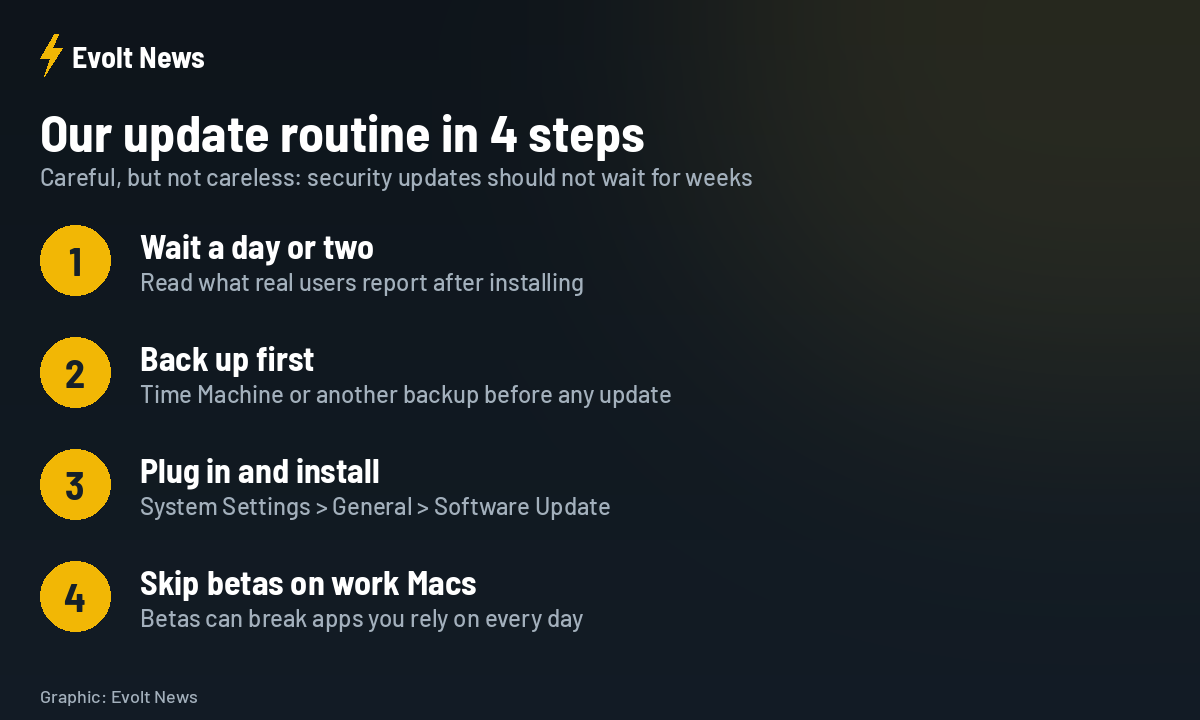
| Step | What to do |
|---|---|
| 1. Wait briefly | Give it a day or two and check user reports |
| 2. Back up | Use Time Machine or another backup |
| 3. Install | System Settings, General, Software Update |
| 4. Avoid betas on work Macs | Betas can break apps you depend on |
macOS 27.0.1 FAQ
What is new in macOS 27.0.1?
Apple lists security fixes and performance improvements. Detailed security notes are usually published within hours of release.
Should I install macOS 27.0.1 right away?
A short wait of a day or two to check user reports is reasonable, but security updates should not be delayed for weeks.
I am still on macOS Tahoe. Do I have to upgrade to macOS 27?
No. Apple released macOS Tahoe 26.7.1 with security fixes, so you can stay on Tahoe and still stay protected.
How do I update my Mac?
Open System Settings, go to General, then Software Update. Back up first and keep your Mac plugged in.
Sources: Apple, 9to5Mac.