Key takeaways
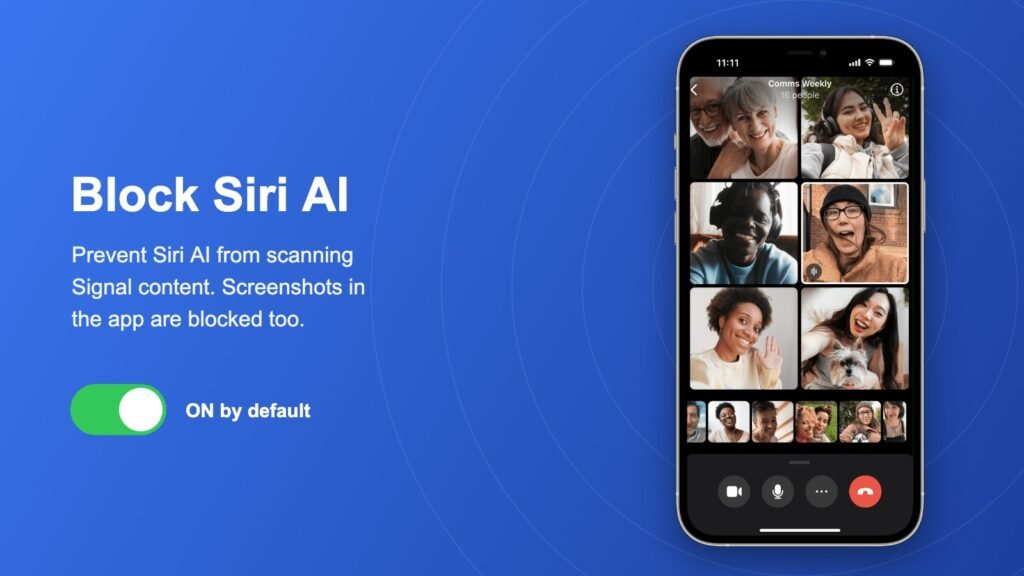
- Signal’s latest iPhone update adds a “Block Siri AI” setting, switched on by default, that stops Siri AI from scanning your chats and also blocks screenshots inside the app.
- Signal says Apple gives app developers no better tool to keep Siri AI and other AI agents away from what is on the screen, so it had to break screenshots to do it.
- My view: when the most private messenger has to protect its users from Apple’s own assistant, “Privacy. That’s iPhone.” is just a slogan on a billboard.
Signal’s newest iPhone update turns on a privacy setting called “Block Siri AI” by default, which “prevents Siri AI from scanning Signal content” and also blocks screenshots in the app and in the App Switcher. Try to take one and you get a message: “Screenshot prevented by ‘Block Siri AI’ setting.” You can switch it off, and the Mac app has no such option.
In this article: A privacy app had to protect you from Apple · “Privacy. That’s iPhone.” Really? · Signal already did this once, to Microsoft · Apple fixed it for users. Not for apps · Who is next after Signal? · What this means for you · My prediction · FAQ
Related: Apple Intelligence now learns how you write. iOS 27 Smart Reply finally writes like you.
A privacy app had to protect you from Apple
Some context first. Siri AI, the new Siri in iOS 27, can see what is on your screen and work with the content of your apps. You ask “what did he write me?” and it reads it for you. Convenient. But it also means an AI reads your private messages, the ones Signal encrypts end to end so that nobody, not even Signal itself, can read them.
Signal doesn’t trust that. And it told Reuters why it went this far: Apple does not give developers a better tool to protect the content of their apps from Siri AI and from third-party AI agents. So Signal took the only switch it has. If the system can’t look at the screen through a screenshot, it can’t scan it either. The price is that you lose screenshots too.
“Privacy. That’s iPhone.” Really?
This is the part that should embarrass Apple. For years Apple has sold the iPhone with one word: privacy. Billboards, ads, keynotes. And now Signal, an app whose whole reason to exist is privacy, has to defend its users against the assistant Apple installs on every iPhone.
Think about it like a building. The landlord promises you the safest apartment in town. Then he gives a spare key to a new cleaning service, and your neighbor, a locksmith, has to put a second lock on his own door because the landlord won’t let him choose who comes in. Who do you trust more after that, the landlord or the locksmith?
And remember: Siri AI runs on Google’s Gemini underneath. Apple says the data stays under control. Maybe. But Signal clearly decided “maybe” is not good enough for people who use Signal precisely because they don’t want to trust anyone.
Signal already did this once, to Microsoft
This is not the first time. In May 2025 Signal did exactly the same thing on Windows 11, when Microsoft launched Recall, a feature that takes snapshots of everything on your screen. Signal switched on screen security by default, and one of its developers said Microsoft “has simply given us no other option.” Now the same words fit Apple.
| Microsoft Recall (2025) | Siri AI (2026) | |
|---|---|---|
| What it does | Saves snapshots of everything on the screen | Reads screen content and app data to answer you |
| Signal’s answer | Screen security on by default in Signal Desktop | “Block Siri AI” on by default on iPhone |
| Side effect | Screenshots of Signal come out blank | Screenshots in Signal are blocked |
| Tool for developers? | No granular opt-out, Signal said | No better tool, Signal told Reuters |
| What the user can do | Turn Recall off or adjust it in Windows | Exclude apps in Settings, Siri, Excluded Apps (iOS 27.2) |
Two years, two giants, the same mistake. Both built an AI that looks at everything, and both forgot to give the apps that hold the most private data a simple way to say “not here.”
Apple fixed it for users. Not for apps
To be fair, Apple did something. Since iOS 27.2 you can open Settings, then Siri, then Excluded Apps, and pick the apps Siri AI is not allowed to read. That is a good step, and privacy groups celebrated it.
But look at who has to do the work. You. Every user, one by one, has to know that this menu exists, find it and add Signal. Most people never will. Signal can’t do it for them, so it does the next best thing and switches the protection on by default. A real privacy company would let a messenger tell the system once: my content is off limits to AI. Apple builds whole new features in a year. A switch for developers is not rocket science.
Who is next after Signal?
Here is the question I keep asking. If Signal had to do this, what about the rest? Banking apps show your balance. Health apps show your results. Work apps show your company’s secrets. I wrote earlier this week how Meta’s Muse AI read Signal chats and showed a stranger’s bank balance. That is exactly the kind of mess Signal is trying to stop before it happens on the iPhone.
And it gets bigger. Apple is now hiring engineers for an AI agent that will use your iPhone and Mac like a person. If apps already have to break screenshots to keep Siri AI out, how will they keep out an agent that clicks and types for you?
What this means for you
If you use Signal on an iPhone, here is the practical part:
- Leave “Block Siri AI” on unless you really need screenshots. Your chats are the reason you picked Signal.
- Need one screenshot? Turn the setting off in Signal’s privacy settings, take it, and switch it back on right away.
- Exclude Signal in iOS too. Open Settings, then Siri, then Excluded Apps, tap Add Apps and choose Signal. Do the same for your banking and health apps.
- On a Mac, Signal has no such switch. Check which AI tools you allowed in System Settings, Privacy & Security, and Full Disk Access, and remove what you don’t use.
My prediction
Apple will not stay quiet for long, because this is a public slap from the most respected privacy app in the world. My bet: in iOS 28 Apple gives developers an official way to keep their app away from Siri AI, and it will present it on stage as a new privacy feature, as if it was Apple’s idea.
Until then, more apps will copy Signal. WhatsApp, banking apps, password managers. And every blocked screenshot will remind people of one thing: on the iPhone, privacy now depends on the app, not on Apple.
Also on Evolt News: Meta’s Muse AI read Signal and showed a stranger’s bank balance · Siri AI gets a daily limit · The UK’s secret Apple backdoor order
Featured image: Signal (press image).
This article is opinion.
Signal and Siri AI: FAQ
Why does Signal block screenshots on iPhone?
Signal’s latest iPhone update adds a “Block Siri AI” setting, on by default, that prevents Siri AI from scanning Signal content. Blocking screen capture is how it keeps the content away from the system, so screenshots in the app and in the App Switcher are blocked too.
Can I turn off “Block Siri AI” in Signal?
Yes. The setting can be switched off in Signal’s privacy settings, which allows screenshots again but lets Siri AI access Signal content.
Why did Signal do this?
Signal told Reuters that Apple does not offer developers better tools to protect app content from Siri AI and third-party AI agents.
Does the Signal Mac app have the same setting?
No. The “Block Siri AI” setting is only in the iPhone app for now. The Mac app has no equivalent.
How do I stop Siri AI from reading an app?
Since iOS 27.2, open Settings, then Siri, then Excluded Apps, tap Add Apps and choose the app. Siri AI then cannot access that app’s content, including through onscreen awareness.
Has Signal done this before?
Yes. In May 2025 Signal turned on screen security by default in Signal Desktop for Windows 11 to block Microsoft’s Recall feature from capturing chats.
Sources: Signal, Reuters, 9to5Mac, Electronic Frontier Foundation, SecurityWeek.
Our Take
Signal now blocks screenshots on the iPhone by default to keep Siri AI out of your chats, because Apple gives developers no better tool to protect app content from AI.
To me it is a clear signal about Apple: the company that sells privacy on billboards made the most private messenger defend its users against Apple’s own assistant.