Key takeaways
- iOS 27.2 brings two CarPlay changes: Apple Podcasts gets “New Episodes” and “Continue Playing” sections, and Siri AI in the car can now remember past conversations and draw on more sources.
- The update also fixes an old bug: custom sorting of Apple Music playlists now carries over from iPhone to CarPlay.
- My view: small, useful fixes. But a Siri that remembers what you asked last week, in your car, is also a Siri that knows more about you. Check your settings before you get used to it.
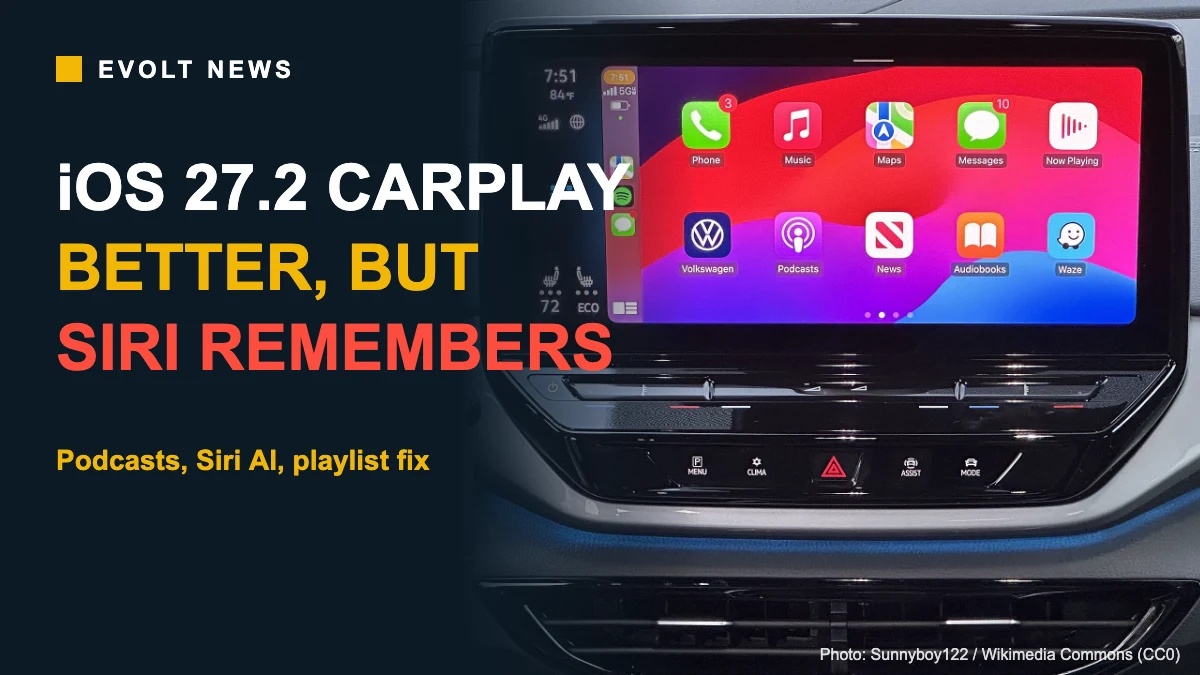
iOS 27.2 adds “New Episodes” and “Continue Playing” sections to Apple Podcasts, and Siri AI upgrades that also work in CarPlay: it can recall past conversations and use more sources, including photos in Messages, Calendar attendees, voicemails, Safari history and Reading List. It also appears to fix a long-standing CarPlay bug where custom playlist sorting from iPhone was ignored.
In this article: Finally, Podcasts that make sense in the car · Siri remembers. Good for you, or good for Apple? · The playlist bug that lived for years · What to do now · My prediction · FAQ
Update: BMW says no to CarPlay Ultra to keep the data. Whose data, BMW?
Finally, Podcasts that make sense in the car
Honestly, this is the kind of update I like. No show, no keynote, just a fix for something people used every day. “New Episodes” shows the latest from your shows, and “Continue Playing” shows what you already started. In the car that is exactly what you need: you don’t scroll, you tap and drive.
It should have been like this from the beginning. But fine, better late than never.
| What changed in CarPlay with iOS 27.2 | Who it helps | My verdict |
|---|---|---|
| Podcasts: “New Episodes” and “Continue Playing” | Commuters who listen to shows | Small, but finally logical |
| Siri AI remembers past conversations | Drivers who ask Siri a lot | Useful, and a privacy question |
| Siri AI reads more sources (Messages photos, Calendar, voicemail, Safari) | Busy drivers | Powerful, check what you allow |
| Apple Music playlist custom sort now works in CarPlay | Anyone with sorted playlists | A bug fix that took far too long |
Siri remembers. Good for you, or good for Apple?
Siri AI can now remember what it told you before, like the restaurants it recommended last week, and it can look into your Messages photos, your calendar, your voicemail and your Safari history to answer. In the car, hands on the wheel, that can really help.
But think about what it means. Your car becomes another place where an assistant collects and connects your life: where you eat, who you meet, what you listen to, what you read. Apple says privacy is its thing, and I believe Apple is more careful than many. Still, the more it knows, the more there is to protect. And don’t forget: Siri AI already has a daily limit, so the smarter it gets, the faster you hit the wall and see an iCloud+ offer.
The playlist bug that lived for years
If you sort your playlists by hand, you know this one. You set the order on iPhone, you get in the car, and CarPlay plays it in a different order. For years. Now iOS 27.2 seems to fix it, and owners on Reddit confirm it.
I am glad. But a trillion-dollar company needing years to respect the order of your songs in the car says a lot about how much attention CarPlay really gets. Meanwhile CarPlay Ultra is still only in Aston Martin.
What to do now
Update to iOS 27.2: Settings, General, Software Update. Then open Podcasts once on the iPhone so the new sections fill in before you drive.
Check Siri: in Settings, under the Siri section, you can see what Siri is allowed to use and you can delete your Siri history. Decide what you want Siri to read before it reads it. And if your iPhone does not support Siri AI, check which iPhones do before you expect any of this in your car.
My prediction
Memory in Siri will be the feature Apple talks about most next year, and in the car it will feel like magic for a few weeks. Then people will ask the first awkward question: why does my car know where I ate last Tuesday? Apple will answer with a new privacy screen. Remember my words.
Also on Evolt News: Siri AI gets a daily limit. I called it · CarPlay Ultra is still only on Aston Martin · Which iPhones support Siri AI
Featured image: Sunnyboy122 / Wikimedia Commons (CC0).
This article is opinion.
iOS 27.2 CarPlay: FAQ
What is new in CarPlay in iOS 27.2?
Apple Podcasts adds “New Episodes” and “Continue Playing” sections, Siri AI can recall past conversations and use more sources, and custom Apple Music playlist sorting now carries over to CarPlay.
Does Siri AI work in CarPlay?
Yes. Siri AI upgrades in iOS 27.2, such as recalling past conversations and drawing on more sources, also work in CarPlay.
What sources can Siri AI use in iOS 27.2?
According to Apple’s release notes, Siri AI can draw from photos attached in Messages, Calendar event attendees, voicemails, and better results from Safari history and Reading List.
Is the CarPlay playlist sorting bug fixed?
iOS 27.2 appears to fix it: custom playlist sort order from the iPhone now carries over to CarPlay, as users have also reported.
Did Apple Music change in iOS 27.2?
Yes. iOS 27.2 includes a new Apple Music app icon and minor design tweaks related to Apple Music’s broader rebrand.
How do I get iOS 27.2?
Open Settings, then General, then Software Update on a supported iPhone, and install iOS 27.2.
Sources: Apple, 9to5Mac.
Our Take
iOS 27.2 makes CarPlay better in small ways: smarter Podcasts sections, a Siri that remembers, and a playlist bug finally fixed.
Use the new Siri, but decide first what it is allowed to read, because a car that remembers is also a car that knows.