Key takeaways
- WhatsApp started rolling out scheduled messages to every iPhone and Android user on November 25, for individual and group chats.
- You long-press the send button and pick a time from 10 minutes to 14 days ahead. Text, photos and videos work, and the message goes out even if your phone is off.
- My view: useful, but about three years late. iPhone owners have had Send Later in iMessage since iOS 18, and Telegram did it long before that.
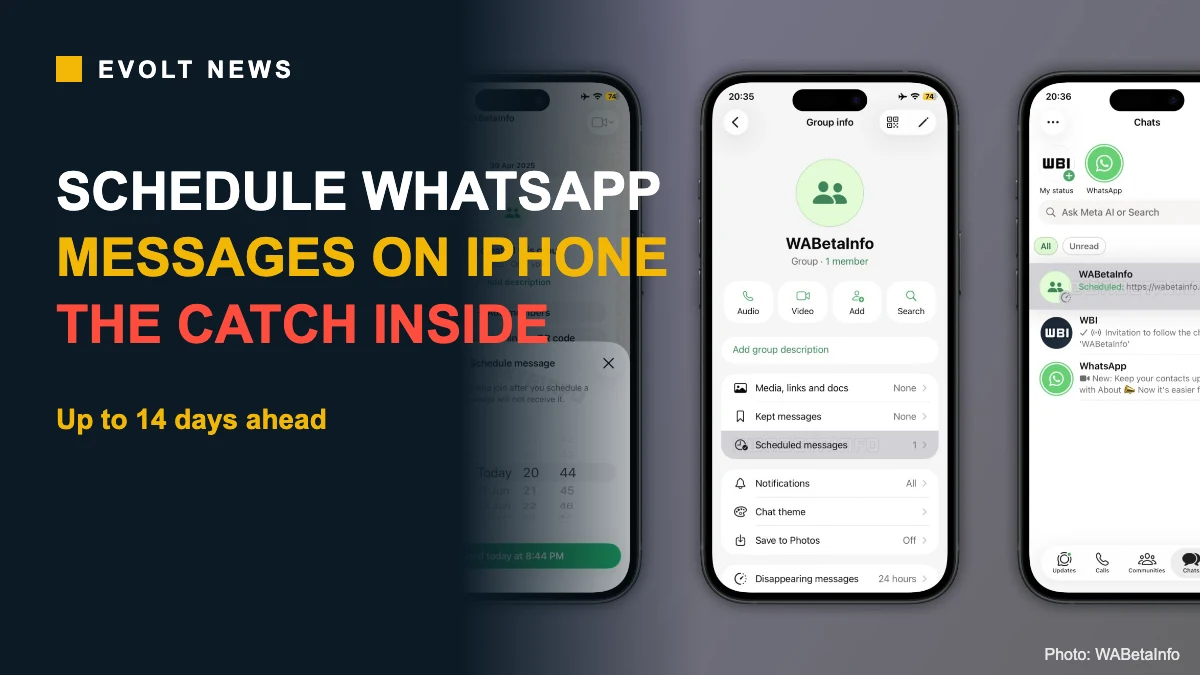
WhatsApp started rolling out scheduled messages to all iOS and Android users worldwide on November 25, 2026, in both individual and group chats. You long-press the send button and choose a delivery time between 10 minutes and 14 days ahead, and text, photos and videos are supported.
In this article: How to schedule a WhatsApp message on iPhone · How to see or delete a scheduled message · You don’t see it yet? Here is why · The catches nobody mentions · My view: good feature, embarrassing date · FAQ
Related: iOS 28 will revamp iPhone notifications
How to schedule a WhatsApp message on iPhone
- Update WhatsApp from the App Store to the latest version.
- Open the chat or the group and type your message, or add one photo or video.
- Do not tap Send. Press and hold the green send button.
- Pick the date and the time. The earliest is 10 minutes from now, the latest is 14 days.
- Check the exact time shown on the green button and tap it to confirm.
You will see a small note in the chat that only you can see. The other person sees nothing until the message arrives, and then it looks like a normal message, not like something you planned two weeks ago.
How to see or delete a scheduled message
Open the chat, tap the name of the person or the group at the top, and you will find a section with scheduled messages. Every message that is waiting is there, and you can delete any of them before it goes out. The other person is not told.
Editing is a different story. So far nobody has shown a way to change the text or the time of a message that is already scheduled. If you made a mistake, delete it and schedule it again. Two taps more, but it works.
You don’t see it yet? Here is why
WhatsApp turns it on in waves, so some people got it on November 25 and others will wait days or weeks. There is no hidden switch to flip. Keep the app updated and check the send button from time to time. If a long press only shows the old options, the feature has not reached your account yet.
The catches nobody mentions
- One photo or video at a time. If you want to schedule five photos, you schedule five messages.
- In groups, the message goes only to people who were in the group when you scheduled it. Someone who joins tomorrow won’t get it.
- 14 days is the maximum. A birthday in a month you still have to remember yourself.
- The big one: plans change, the message stays. Cancel a meeting and forget the scheduled “see you at 7”, and it goes out anyway.
| iMessage (Send Later) | ||
|---|---|---|
| Available since | November 2026 | iOS 18, 2024 |
| How | long-press Send | tap +, then Send Later |
| Earliest | 10 minutes ahead | any time later |
| Latest | 14 days ahead | 14 days ahead |
| Groups | yes | yes |
| Works on Android | yes | no |
My view: good feature, embarrassing date
Let’s be honest. WhatsApp has around 3 billion users and needed until the end of 2026 for something Telegram had for years and Apple put into iMessage with iOS 18 in 2024. I don’t know what Meta’s engineers were doing all that time, but it surely wasn’t this.
Still, I will use it, and I think most people will. A birthday message at midnight while you sleep, a reminder to a colleague in another time zone, a note to the family before a trip. And one thing is better than iMessage: it works for your Android friends too. Just check that section in the chat before your plans change, because a scheduled message doesn’t know you changed your mind.
Also on Evolt News: Signal blocks screenshots on iPhone because of Siri AI · Siri AI compatible devices: the full list · iOS 27.3: every feature
Featured image: WABetaInfo.
This article is opinion.
WhatsApp scheduled messages: FAQ
How do I schedule a message on WhatsApp on iPhone?
Type the message, press and hold the send button, pick a date and time, and tap the green button to confirm.
How far ahead can I schedule a WhatsApp message?
From 10 minutes to 14 days ahead.
Can I schedule photos and videos?
Yes, but one at a time. Several photos or videos have to be scheduled as separate messages.
Does it work if my phone is off?
Yes. According to the rollout reports, the message is sent at the chosen time even if your phone is off or has no signal.
How do I cancel a scheduled WhatsApp message?
Open the chat info by tapping the name at the top, find the scheduled messages section and delete the message. The recipient is not notified.
Why don’t I have scheduled messages yet?
WhatsApp started the rollout on November 25, 2026 and it reaches users in waves. Update the app and check again later; there is no manual switch.
Sources: WhatsApp, TechCrunch, WABetaInfo, 9to5Mac, iPhone in Canada, Engadget.
Our Take
WhatsApp finally lets everyone schedule messages up to 14 days ahead with a long press on Send, in chats and groups, even with the phone off.
To me it is a useful feature that arrives years after Telegram and iMessage, and the only real danger is the message you forget to delete when your plans change.